'/%3e%3cpath%20d='M37.8504%2018.9728C38.6408%2019.754%2039.5913%2020.1446%2040.7021%2020.1446C41.8128%2020.1446%2042.7527%2019.754%2043.5217%2018.9728C44.312%2018.1915%2044.7072%2017.1041%2044.7072%2015.7105C44.7072%2014.3169%2044.312%2013.2294%2043.5217%2012.4482C42.7527%2011.6669%2041.8128%2011.2763%2040.7021%2011.2763C39.5913%2011.2763%2038.6408%2011.6669%2037.8504%2012.4482C37.0814%2013.2294%2036.697%2014.3169%2036.697%2015.7105C36.697%2017.1041%2037.0814%2018.1915%2037.8504%2018.9728ZM34.7745%209.78766C36.3552%208.22514%2038.331%207.44388%2040.7021%207.44388C43.0731%207.44388%2045.0383%208.22514%2046.5976%209.78766C48.1783%2011.3502%2048.9686%2013.3244%2048.9686%2015.7105C48.9686%2018.0965%2048.1783%2020.0707%2046.5976%2021.6333C45.0383%2023.1958%2043.0731%2023.977%2040.7021%2023.977C38.331%2023.977%2036.3552%2023.1958%2034.7745%2021.6333C33.2152%2020.0707%2032.4355%2018.0965%2032.4355%2015.7105C32.4355%2013.3244%2033.2152%2011.3502%2034.7745%209.78766Z'%20fill='var(--fill-0,%20white)'/%3e%3cpath%20d='M5.4149%2018.9728C6.20524%2019.754%207.15579%2020.1446%208.26654%2020.1446C9.37729%2020.1446%2010.3172%2019.754%2011.0861%2018.9728C11.8765%2018.1915%2012.2716%2017.1041%2012.2716%2015.7105C12.2716%2014.3169%2011.8765%2013.2294%2011.0861%2012.4482C10.3172%2011.6669%209.37729%2011.2763%208.26654%2011.2763C7.15579%2011.2763%206.20524%2011.6669%205.4149%2012.4482C4.64592%2013.2294%204.26143%2014.3169%204.26143%2015.7105C4.26143%2017.1041%204.64592%2018.1915%205.4149%2018.9728ZM2.33898%209.78766C3.91966%208.22514%205.89552%207.44388%208.26654%207.44388C10.6376%207.44388%2012.6027%208.22514%2014.1621%209.78766C15.7427%2011.3502%2016.5331%2013.3244%2016.5331%2015.7105C16.5331%2018.0965%2015.7427%2020.0707%2014.1621%2021.6333C12.6027%2023.1958%2010.6376%2023.977%208.26654%2023.977C5.89552%2023.977%203.91966%2023.1958%202.33898%2021.6333C0.779661%2020.0707%200%2018.0965%200%2015.7105C0%2013.3244%200.779661%2011.3502%202.33898%209.78766Z'%20fill='var(--fill-0,%20white)'/%3e%3cpath%20d='M22.1179%201.08627H17.9164L17.9243%2019.2885C17.9243%2021.8906%2020.0337%2024%2022.6357%2024H24.0775L24.0775%2020.153C23.971%2020.153%2023.8987%2020.1545%2023.837%2020.1558C23.7283%2020.1581%2023.6525%2020.1597%2023.481%2020.1511C22.7864%2020.1511%2022.1216%2019.6066%2022.1216%2018.7285H22.1179V1.08627Z'%20fill='var(--fill-0,%20white)'/%3e%3cpath%20d='M29.4871%205.79432V1.13843H25.3063V12.6451H25.3036V18.7449C25.3036%2021.6296%2027.6422%2023.9682%2030.527%2023.9682C32.5598%2023.9682%2033.6029%2022.8822%2033.6367%2022.8464C33.6238%2022.8338%2033.611%2022.8211%2033.5981%2022.8084C32.8486%2021.9193%2032.1417%2020.9468%2031.6168%2019.9211C30.2873%2020.6513%2029.4877%2019.8886%2029.4877%2018.8455V12.6451H29.4871V9.53171H32.6227V5.79432H29.4871Z'%20fill='var(--fill-0,%20white)'/%3e%3c/g%3e%3c/svg%3e)
10 best interactive demo software in 2026, ranked by use case
Interactive demo software helps teams turn a passive product explanation into something buyers can actually explore. Instead of waiting for a sales call, prospects can interact with the product, understand key workflows, and evaluate its value on their own.
The right platform depends on the type of demo you need, your use case, and how much customization you want. This guide compares the 10 best interactive demo software in 2026, including their features, pricing, limitations, and best-fit use cases.
 By Kintan Brahmbhatt
Buyer guide
Best interactive demo software
Pricing checked
Quick comparison: top interactive demo software at a glance
Here’s a quick overview of the best interactive demo software, compared by pricing, best use cases, and demo types.
| Tool | Best for | Demo type | Who builds it | Entry price | Free tier | G2 rating |
|---|---|---|---|---|---|---|
| Olto | Live demos, AI Demo Agents, personalized product experiences | Live overlay, AI Demo Agents, sandbox, HTML, video | Sales, SE, Presales, GTM | Custom | No | 4.9/5 |
| Storylane | Interactive HTML demos and AI buyer engagement | HTML, screenshot, video, AI agent | Marketing, Sales, SE | From $40/mo | Yes | 4.7/5 |
| Navattic | Marketing and ABM interactive demos | HTML/CSS | Marketing, Sales, SE | From $500/mo | Yes | 4.8/5 |
| HowdyGo | Easy-to-create HTML demos and product content | HTML, video, sandbox | Product Marketing, Sales, CS | From $159/mo | No | 5/5 |
| Walnut | Sales-led interactive demos and deal rooms | HTML, interactive demos, AI | Sales, Presales, Marketing | From $575/mo | No | 4.5/5 |
| Arcade | Product videos and polished interactive demos | Interactive demo, video | Marketing, Sales Engineering, Product | From $42.50/mo/seat | Yes | 4.6/5 |
| Supademo | Guided demos, training, and AI demo agents | Interactive, video, sandbox, AI agent | CS, Sales, SE, L&D | From $38/mo/creator | Yes | 4.7/5 |
| Reprise | Enterprise demo creation and governance | HTML, application clone, tour, AI | Sales, Marketing, Presales | Custom | No | 4.4/5 |
| Consensus | Buyer-led demos and demo analytics | HTML, video, sandbox, live | Presales, Sales, Marketing, CS | Custom | No | 4.7/5 |
| Saleo | Live product demos with realistic demo data | Live, HTML, mobile/desktop tour, AI agent | Sales, Marketing, SE | Custom | No | 4.9/5 |
Pricing and plan details were checked as of October 2026, where publicly available. Vendors may change prices, seat limits, billing terms, and feature access, so confirm the current package before purchasing.
What is interactive demo software?
Interactive demo software lets companies create a guided version of their product that prospects can explore on their own, without needing access to the actual product or waiting for a live sales call.
Interactive product demo software helps buyers understand how the product works in real use cases, explore the features that matter to them, evaluate value without committing to the actual product, and build a more memorable understanding of the product experience.
These experiences can be used across the buyer and customer journey, including product discovery, sales demos and evaluations, post-call follow-ups, product education, and customer onboarding.
What do interactive demo platforms usually do?
Most platforms help teams take a product workflow and turn it into a product experience. Common approaches to interactive demos include:
- Capture
- Create
- Edit
- Customize
- Personalize
- Share
- Track
HTML demos
Recreate the product interface as a clickable experience.
Cloned apps
Give prospects a replica of the product to explore.
Guided videos
Combine video with interactive or guided elements.
Data injection
Show customized or realistic data within the product experience.
Sandboxes
Give prospects more freedom to experiment and interact with the product.
AI agents
Let buyers ask questions, navigate the experience, or receive personalized responses.
HTML capture vs. screenshot capture: why the format matters
Screenshot demos are a series of curated product screenshots arranged into a guided walkthrough. Each screen can include callouts or explanations, and users typically move from one step to the next. They are simple to set up and work well for quick product explanations without extensive customization.
HTML demos recreate the product interface so users can click through and interact with it without disrupting the actual product. Rather than following only a fixed sequence, buyers can interact with different parts of the interface and get a better feel for the product. They fit deeper customization across presales, sales engineering, sales conversations, and onboarding.
| Parameter | HTML | Screenshots |
|---|---|---|
| Capture method | Captures the product UI as editable HTML/CSS | Captures product screens as static images |
| Best for | Interactive demos, detailed product walkthroughs, and personalized buyer experiences | Simple product overviews, quick walkthroughs, and lightweight demos |
| Editing flexibility | High: edit text, images, charts, and UI elements within the demo | Low: mainly add hotspots, annotations, or overlay text |
| Personalization per buyer | Change names, data, charts, images, and other UI elements | Personalize around the screenshot; the product UI itself stays unchanged |
10 best interactive demo software in 2026, ranked by use case
Here’s a detailed list of the best interactive demo software, compared by use cases, pricing, limitations, G2 ratings, and key features.
1. Olto
Olto is an AI-native product experience platform for revenue teams. It helps teams turn their product into buyer-facing experiences across the customer journey.
Instead of using separate tools for demos, sandboxes, product tours, videos, and guides, Olto brings these formats together on one platform, powered by a product-trained AI model.
Use cases
Sales, Solutions Engineering, Presales, Marketing, and GTM teams
Key features
Prospect-specific data to live demos
Show the real product with relevant data tailored to the buyer, without creating a separate demo environment for each prospect.
Trained on the product, not a script
Olto is trained on how the product works, rather than following a fixed demo script.
AI Demo Agents
Walk buyers through the product, answer questions, understand their intent, and route relevant next steps to your team.
Keep personalization consistent
Personalization across different screens and workflows, keeping the experience relevant throughout the demo.
Multiple product experiences
Build live demos, AI Demo Agents, sandboxes, product tours, videos, and how-to guides from the same platform.
Give access to the product 24/7
Buyers can explore the product and interact with the product whenever they are ready, without waiting for a scheduled demo.
Runs on the front end
Olto works as a front-end layer on top of the product, so teams don't need to build a separate environment or backend/API project for demos.
Customer reviews
4.9/5 on G2. Customers value the time saved on demo creation, flexible customization, quick prospect-specific personalization, and responsive customer support.
A limitation to consider
Olto is designed mainly for web products, so mobile-first teams should assess whether it suits their product needs.
Pricing
Olto offers custom pricing.
2. Storylane
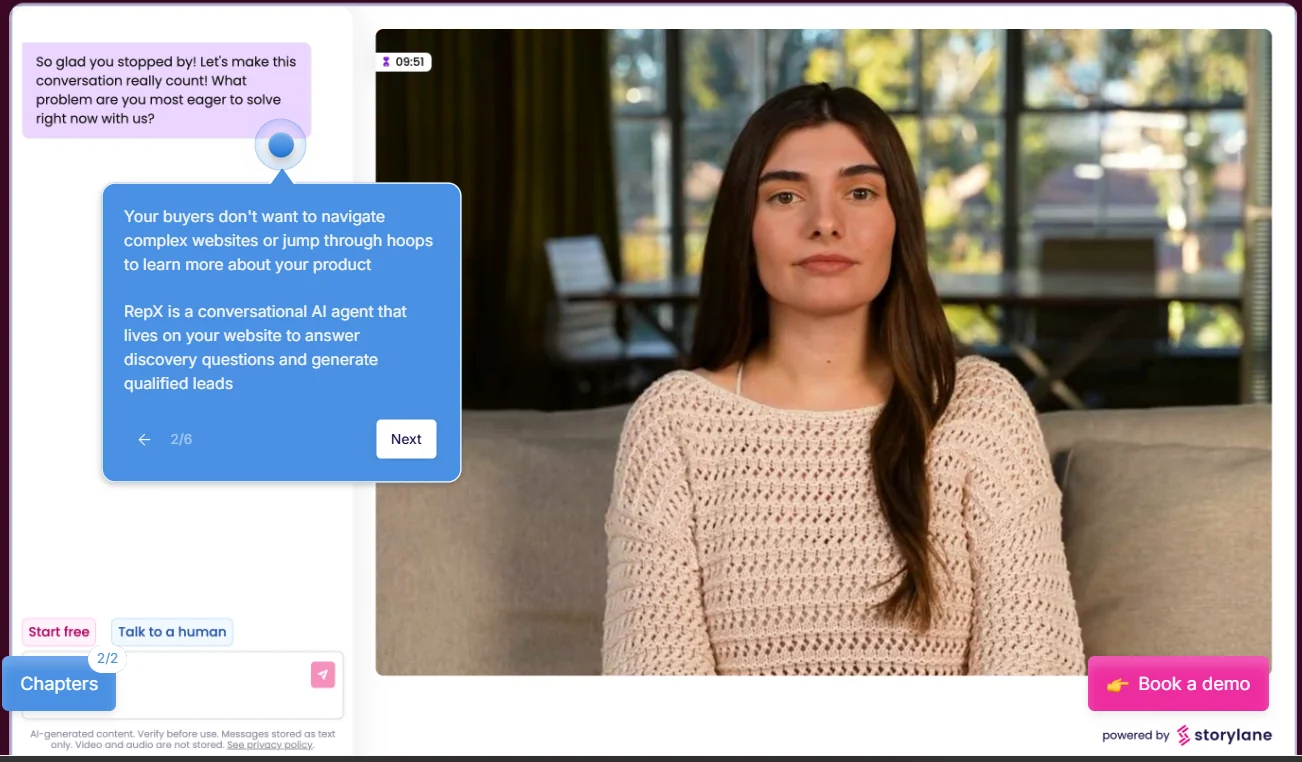
Storylane is an interactive demo platform with two main products: Demo Suite and RepX. Together, they support buyers across the research, evaluation, and decision stages by helping them explore the product, understand its fit, and get answers before engaging with sales.
Use cases
Growth & Demand Gen, Sales Reps, Presales & SEs
Key features
Interactive HTML and screenshot demos
Capture your product and turn it into guided, interactive demos.
AI-assisted demo creation
Automatically generate guide content from captured product screens.
Hubs
Combine multiple demos and resources into a single destination.
No-code editing
Edit text and elements, blur sensitive information, add zooms, and connect screens without developers.
RepX AI SDR
Engage website visitors, answer product questions, run discovery, qualify leads, show relevant demos, and drive conversions.
AI guardrails
Set rules for what RepX can and cannot discuss, including pricing, competitors, and compliance topics.
Customer reviews
4.7/5 on G2. Customers highlight Storylane's ease of use, quick learning curve, and simple demo editing.
A limitation to consider
Storylane has a limited selection of avatars, and its AI voice quality may vary for some languages.
Pricing
Storylane has a free plan, while paid Demo Suite plans start at $40/month for Starter, $500/month for Growth, and $1,200/month for Premium, with Enterprise pricing available on request. RepX is priced separately.
3. Navattic
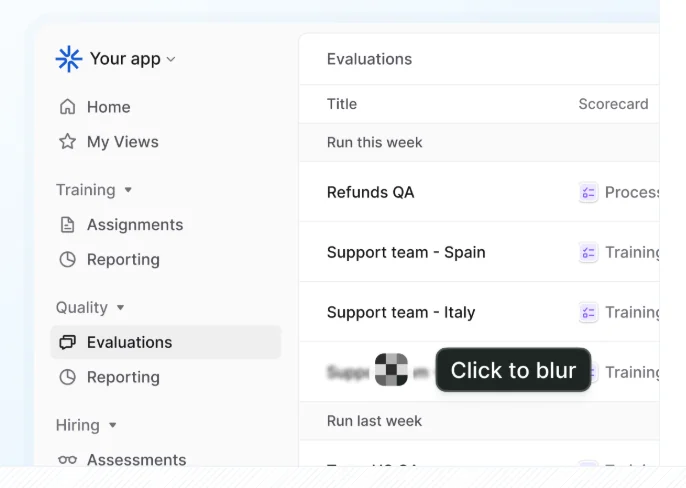
Navattic's goal is to make buying software easier. It is a no-code demo automation platform built primarily for marketing and ABM teams, with interactive HTML/CSS demos that let prospects explore a product.
Use cases
Marketing, Growth & Demand, Sales reps, Solution Engineers
Key features
Interactive HTML demos
Capture a product as a pixel-perfect interactive demo that preserves hover states, animations, and other interactions.
No-code editing
Edit text, images, charts, and other elements directly in the captured demo. Teams can also blur sensitive data, replace dates, and update information across multiple screens.
Copilot
Helps teams build and update demos faster using AI prompts. It can generate demos, personalize content, and edit demo data.
Demo sharing and embedding
Add demos to websites, landing pages, campaigns, emails, or share them directly with prospects through custom links.
Launchpad
Helps sales and solution engineering teams organize reusable demos, share them before or after calls, track engagement, and get alerts when prospects interact with demos.
Customer reviews
4.8/5 on G2. Customers highlight Navattic for its ease of use, realistic HTML demos, and no-code editing.
A limitation to consider
Advanced features have a learning curve, reporting could offer more flexibility, and higher-tier pricing may be expensive for smaller teams.
Pricing
Navattic offers a free Starter plan, while paid plans start at $500/month for Base and $1,000/month for Growth, with custom pricing for Enterprise.
4. HowdyGo
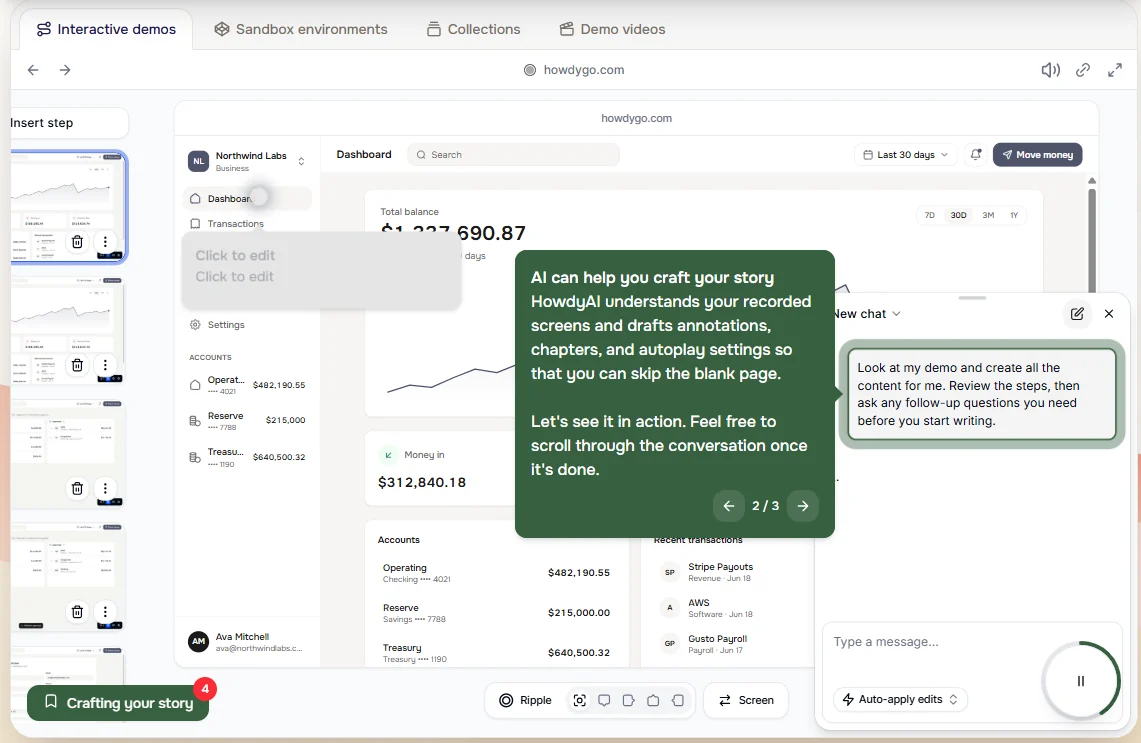
HowdyGo helps teams turn their product into interactive HTML demos, sandboxes, collections, and demo videos for marketing and sales. It works well for growing GTM teams that need scalable product demos.
Use cases
Product Marketers, Customer Success, Sales & SEs
Key features
HTML product capture
Records each click, drag, input, and navigation as an individual step and captures the product in HTML.
AI-assisted demo creation
HowdyAI can generate annotations, chapters, and autoplay settings from the recorded screens.
Guided walkthroughs
Add annotations, AI voiceovers, video bubbles, and branded styling to explain the product.
Shareable and offline demos
Each demo gets a shareable URL that stays updated as the demo changes, and demos can also work offline.
Embeds and exports
Embed demos on websites, products, and documentation, or export them as videos and GIFs for marketing.
Customer reviews
5/5 on G2. Customers highlight HowdyGo for its flexible features, ease of use, and responsive customer support.
A limitation to consider
Limited high-level reporting makes it harder to monitor overall demo performance and measure its impact over time.
Pricing
HowdyGo offers a 14-day free trial, with paid plans starting at $159/month for Starter and $399/month for Pro.
5. Walnut
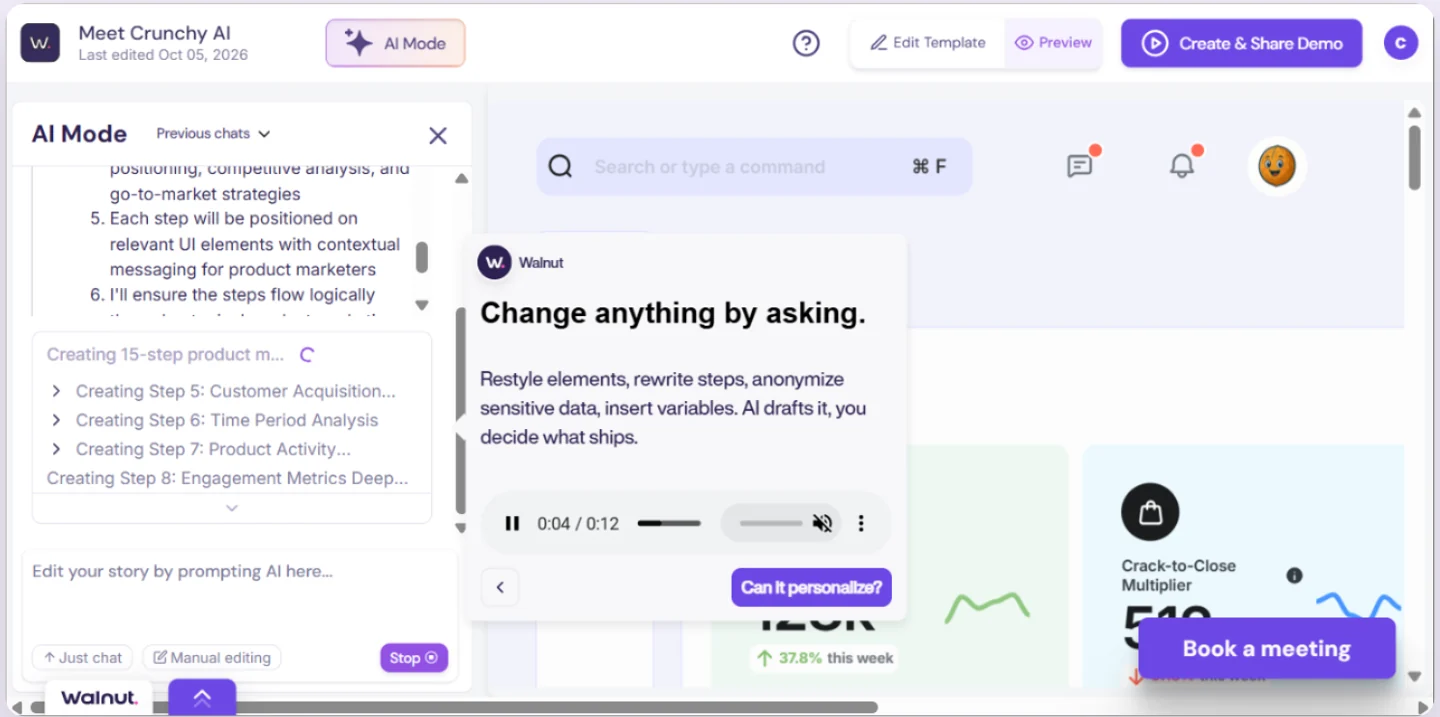
Walnut helps teams create personalized interactive demos, bundle them into guided playlists and deal rooms, and use buyer engagement signals to understand deal momentum. It works well for revenue teams looking for AI-powered buyer enablement across the sales cycle.
Use cases
Presales, Sales, Marketing, Ops & Enablement, Customer Success
Key features
Interactive demos
Create personalized interactive demos that let buyers explore your product.
Buyer Xpert
AI assistant that answers buyer questions directly inside demos.
Deal Rooms
Create personalized spaces with demos, documents, and next steps for each deal.
Integrations
Connect buyer engagement data with CRM and other GTM tools.
AI personalization
Customize demos for different buyers using AI.
Analytics
Track how buyers interact with demos and deal rooms.
Customer reviews
4.5/5 on G2. Customers like the flexible demos, intuitive interface, and HubSpot integration.
A limitation to consider
Keeping demos up to date can require regular maintenance, especially when the product changes frequently.
Pricing
Walnut starts at $575/month for Ignite, with Accelerate at $1,550/month. Its Scale plan has custom pricing.
6. Arcade
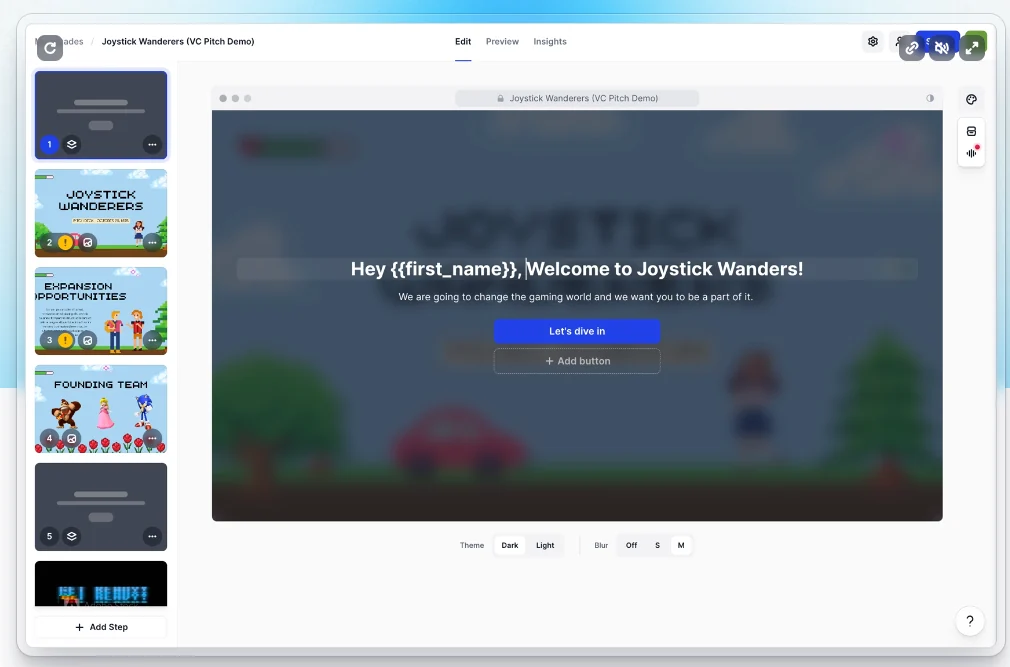
Arcade helps GTM teams turn their products into videos and interactive demos for marketing, sales, and customer education. It combines AI content creation with no-code demo tools, allowing teams to create, customize, and share product content without relying heavily on design resources.
Use cases
Marketing, Product Management, Sales Engineering
Key features
AI videos
Turn product demos, screenshots, and prompts into on-brand product videos.
Interactive demos
Create polished, interactive product demos with branching, chapters, callouts, and hotspots.
Personalization
Customize demos for different prospects, use cases, or personas with variables and editable product content.
AI editing
Edit videos and demos using simple prompts or make changes manually.
Analytics
Track how viewers interact with your demos and which paths they follow.
Integrations
Connect Arcade with tools like HubSpot, Salesforce, Slack, Google Analytics, and PostHog.
Brand kit
Apply your brand colors, fonts, tone, and visual style automatically to created content.
Customer reviews
4.6/5 on G2. Customers like Arcade for its ease of use and fast content creation.
A limitation to consider
Video editing can feel clunky, especially when splitting clips or undoing AI-generated edits.
Pricing
Arcade offers a free plan. The Growth plan costs $42.50/month per seat, and Enterprise pricing is custom.
7. Supademo
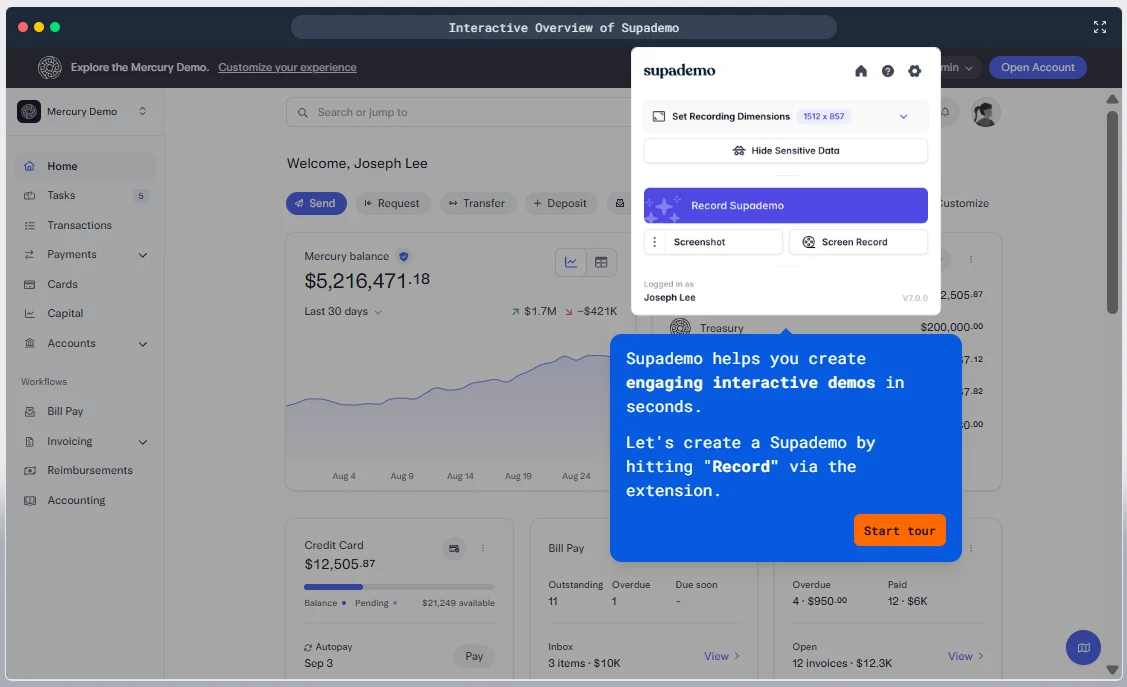
Supademo is an AI-powered product demo platform that helps teams create interactive demos, videos, and AI Demo Agents to showcase, sell, onboard, and train users across the customer journey.
Use cases
Customer Success, Customer Education, Sales Reps, Solution Engineers, L&D Teams
Key features
Guided demos
Record a product workflow and turn it into a clickable, step-by-step demo with editable screens, chapters, annotations, and voiceovers.
Route Hub
Create one shareable link that directs different viewers to relevant demos, videos, decks, and resources based on their needs.
Demo Hub
Create a central library where users can browse and access multiple product demos from one place.
AI Demo Agent
Add an AI agent that answers product questions, qualifies visitors, and recommends relevant demos or resources.
Sandbox demos
Give users a safe, interactive version of your product to explore without creating accounts or accessing real product data.
Mobile demos
Capture mobile app workflows and turn them into touch-friendly, interactive demos.
Customer reviews
4.7/5 on G2. Customers highlight Supademo's lightweight browser extension and AI-powered features.
A limitation to consider
Advanced editing can take some time to learn, and making precise adjustments to hotspots can be challenging.
Pricing
Supademo offers a free plan. Paid plans start at $38/month per creator, followed by Business at $199/month and Growth at $350/month for 5 creators, all billed annually. Enterprise pricing is custom.
8. Reprise
Reprise is an enterprise AI demo platform built for GTM teams, particularly sales, marketing, and solutions engineering. It helps teams create and manage product demos at scale while maintaining control, security, and governance.
Use cases
Presales, Marketing, Sales
Key features
Data injection
Add realistic, synthetic, or personalized data to product screens without exposing real customer information.
Product tours
Create guided, interactive product walkthroughs with AI-generated guides, hotspots, media, and interactions.
Application clones
Create a standalone version of the product that looks and behaves like the real application.
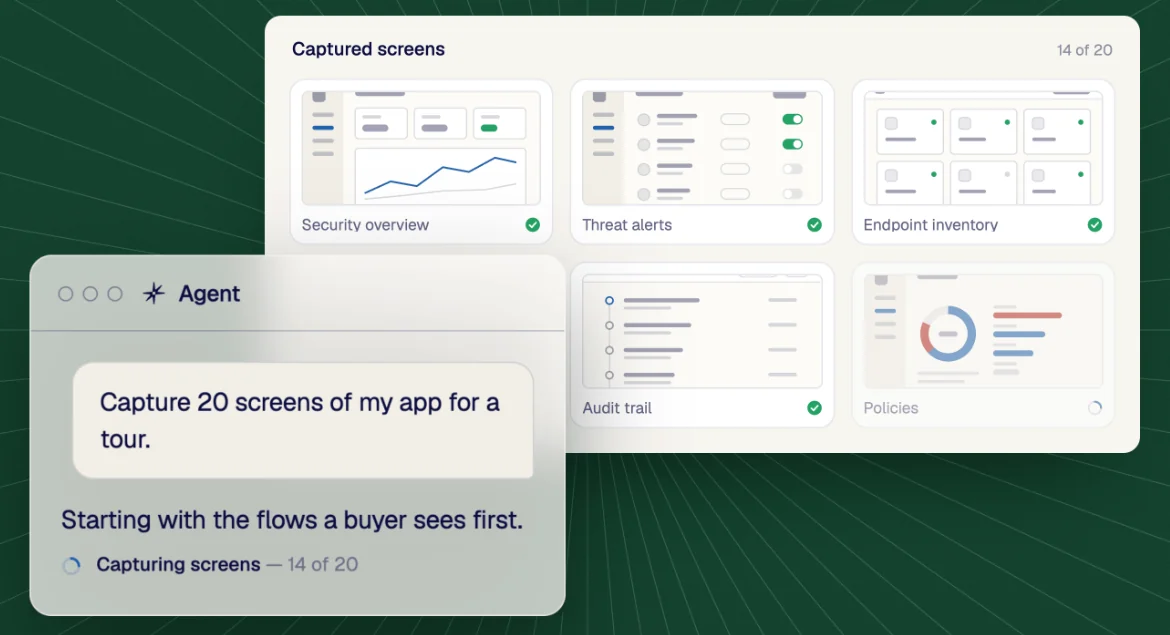
AI-powered demo creation
Use Reprise's AI agent or MCP to build, customize, update, and personalize demos using natural-language prompts.
Demo Flows and Deal Rooms
Connect demos with personalized buyer journeys, forms, and deal content, while tracking engagement and integrating with sales and marketing systems.
Customer reviews
4.4/5 on G2. Customers highlight Reprise's customization, ease of use, and strong support.
A limitation to consider
Complex demos can have a steeper learning curve; analytics and automation could also be more robust.
Pricing
Reprise offers custom pricing.
9. Consensus
Consensus is a demo automation and product experience platform that helps companies create buyer-led product experiences. It combines interactive demos, AI-powered experiences, and demo analytics to help buyers explore products and help businesses understand what they care about.
Use cases
Presales, Sales, Marketing, Customer Success
Key features
Interactive product tours
Buyers can click through HTML captures or tailored sandbox environments to explore specific product features.
Live demos
Teams can demo the actual product with controlled, personalized data.
AI Demo Agents
AI agents can run product demos autonomously, answer buyer questions, and let prospects explore without a rep present.
Video demos
Create personalized, on-demand video experiences that buyers can watch and share with other stakeholders.
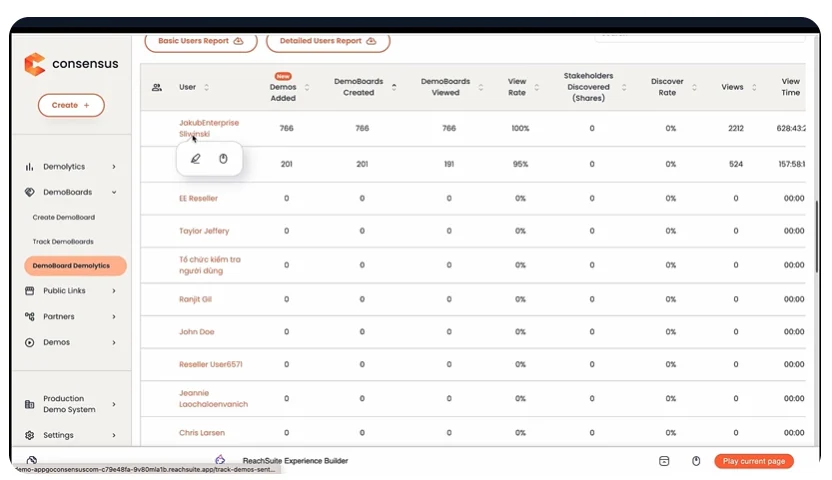
Demolytics
Tracks who viewed demos, what they explored, which stakeholders joined, engagement levels, and other buying signals.
DemoBoards and BuyerBoards
Branded spaces where buyers can access demos and share them with other stakeholders.
Integrations
Connects demo engagement data with CRMs, marketing tools, sales enablement platforms, and other GTM systems.
Customer reviews
4.7/5 on G2. Customers highlight Consensus for its personalization, intuitive DemoBoards, and in-depth analytics.
A limitation to consider
The UI could be more polished in some areas, while backend organization and efficiency could be improved.
Pricing
Consensus offers custom pricing.
10. Saleo
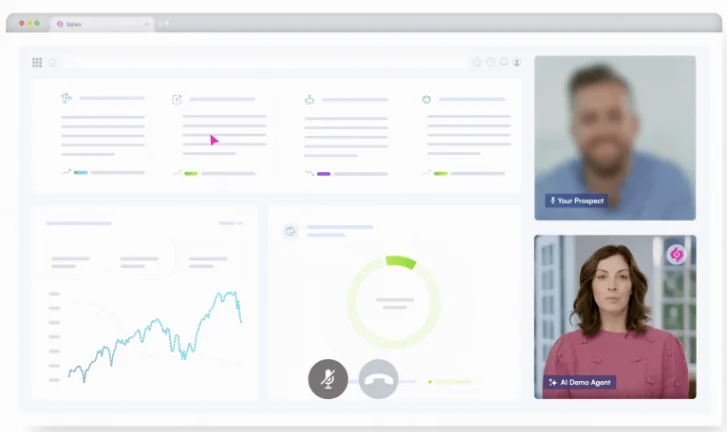
Saleo is an AI-native demo platform, now owned by Consensus, that helps companies create and deliver realistic product experiences. It combines live demos with controlled demo data, AI Demo Agents, and interactive product tours.
Use cases
Sales, Marketing, Sales Engineering
Key features
Live demos
Run demos directly in the native product with realistic, personalized demo data.
AI data creation
Generate realistic, industry-specific demo data using natural-language prompts, without spreadsheets or manual entry.
Demo data control
Edit and customize tables, graphs, text, images, and workflows, with changes applied across demos.
Interactive product tours
Capture web, mobile, or desktop products and turn them into guided or self-guided interactive demos.
AI Demo Agent
Let an AI agent deliver demos, respond to buyer questions, navigate use cases, and adapt the experience in real time.
Demo Sync
Make changes from a central template and apply them across thousands of connected demos.
Analytics and integrations
Track demo engagement and connect Saleo with other tools in the GTM stack.
Customer reviews
4.9/5 on G2. Customers highlight Saleo's quick setup and responsive support team.
A limitation to consider
Frequent product changes and complex initial setup can make Saleo harder to maintain.
Pricing
Saleo uses custom pricing.
How to choose interactive demo software
Before choosing product demo software, first define what you need, which use cases you want to try, your budget, and the features, capabilities, and support you require.
Demo type and capabilities
Start with the experience you want to deliver, then choose the platform that can create it: full app or HTML cloning, screenshot demos, data injection, agentic AI, sandbox environments, enterprise capabilities, or multiple formats including demos and guides.
Primary use cases
Choose based on where and why you will use the demos. Marketing needs website demos; sales needs personalized calls and follow-ups; lead generation needs buying-intent signals; product education and onboarding need clear workflows; self-serve evaluation needs 24/7 access.
Pricing and scalability
Compare the total cost of your actual requirements. Consider demo type, support, creator seats, enterprise features, and which advanced capabilities are restricted to higher-tier plans.
Cross-team usability
Evaluate whether different teams can reuse and modify the same demo experience for their workflows.
Security and compliance
Check access controls, permissions, data protection, and relevant compliance certifications against your company’s requirements.
AI capabilities
Evaluate how AI helps create and edit demos, personalize by industry or persona, guide prospects, identify buyer intent, and explain engagement analytics.
The ROI of interactive demo software
Using demo automation tools can reduce manual work, increase buyer engagement, and generate better-qualified leads, helping the investment pay off faster.
Saves sales time
The product can explain key features and answer common questions, so sales reps don’t have to repeat the same walkthroughs.
Works 24/7
Buyers can explore the product and get answers whenever they want, even when no salesperson is available.
Scales easily
Teams can engage more prospects without needing to create or deliver every demo manually.
Automates qualification
AI agents can understand buyer questions and intent, helping identify which prospects are worth a sales conversation.
Improves sales efficiency
Sales reps get more context before a conversation and can spend more time on qualified prospects.
Insider tips for winning interactive demos
No matter which interactive demo tool you choose, keep these best practices in mind:
Make it mobile-friendly
Check the demo on smaller screens. Buttons, text, and navigation should remain easy to use.
Personalize the full experience
Tailor the demo to the buyer’s needs across the entire flow, keeping messaging and examples relevant from start to finish.
Edit the experience as needed
Adjust visuals, colors, overlays, CTAs, and navigation so the demo feels clear and easy to follow.
Keep it simple
Show buyers what matters and avoid too much text or too many elements.
Create a clear story
Connect screens into a logical journey rather than treating each as a separate step.
Test everything before sharing
Check links, interactions, navigation, and other elements before sharing a demo.
Use analytics to improve
Review what buyers explore and where they lose interest, then improve the experience.
Frequently asked questions
What is the best interactive demo software in 2026?
The best interactive demo software in 2026 depends on what you need from your demos, your budget, and how much support or customization you want. If you need a consolidated product experience with live data injection, CRM-triggered automated demos, and quick implementation, Olto is worth considering.
How do I choose between screenshot, HTML, and video?
Screenshot demos suit teams new to demo automation or simple demos with limited personalization. HTML demos suit more interactive, personalized experiences, with editable product elements. Video demos help show the product in action, communicate its value, or create content for social channels.
What does interactive demo software cost?
Interactive demo software can range from free plans to enterprise pricing. Some tools offer custom pricing based on your needs. Compare the features you need, sandboxes or full product cloning, support, and creator or editor seats.
Which interactive demo software is best for sales teams?
Olto works well for revenue teams that want to automate and personalize the sales experience. It supports CRM-triggered demos that can run 24/7, with AI trained on the actual product rather than pre-written scripts. Teams can use buyer intent analytics to understand how prospects interact with the product while managing different product experiences in one place.
Do interactive demos improve conversion?
Interactive demos can help improve conversion by helping buyers understand the product and its value faster. Personalization makes the experience more relevant, while 24/7 access lets prospects explore without waiting for a sales rep to schedule a demo.
Can I create interactive demos without coding?
Yes. Depending on the platform, you can build screenshot demos, HTML demos, or live demos with data injection without writing code.
Is there free interactive demo software?
Yes. Some platforms offer free plans, while others offer free trials. Free plans usually limit demos, creator seats, analytics, or customization. Navattic, Storylane, and Supademo offer free tiers.
What is the difference between interactive demos and product tours?
Interactive demos usually help prospects evaluate a product before signup through websites, sales emails, or evaluation experiences. Product tours are usually used inside the product to guide existing users through features, onboarding steps, or specific workflows.