'/%3e%3cpath%20d='M37.8504%2018.9728C38.6408%2019.754%2039.5913%2020.1446%2040.7021%2020.1446C41.8128%2020.1446%2042.7527%2019.754%2043.5217%2018.9728C44.312%2018.1915%2044.7072%2017.1041%2044.7072%2015.7105C44.7072%2014.3169%2044.312%2013.2294%2043.5217%2012.4482C42.7527%2011.6669%2041.8128%2011.2763%2040.7021%2011.2763C39.5913%2011.2763%2038.6408%2011.6669%2037.8504%2012.4482C37.0814%2013.2294%2036.697%2014.3169%2036.697%2015.7105C36.697%2017.1041%2037.0814%2018.1915%2037.8504%2018.9728ZM34.7745%209.78766C36.3552%208.22514%2038.331%207.44388%2040.7021%207.44388C43.0731%207.44388%2045.0383%208.22514%2046.5976%209.78766C48.1783%2011.3502%2048.9686%2013.3244%2048.9686%2015.7105C48.9686%2018.0965%2048.1783%2020.0707%2046.5976%2021.6333C45.0383%2023.1958%2043.0731%2023.977%2040.7021%2023.977C38.331%2023.977%2036.3552%2023.1958%2034.7745%2021.6333C33.2152%2020.0707%2032.4355%2018.0965%2032.4355%2015.7105C32.4355%2013.3244%2033.2152%2011.3502%2034.7745%209.78766Z'%20fill='var(--fill-0,%20white)'/%3e%3cpath%20d='M5.4149%2018.9728C6.20524%2019.754%207.15579%2020.1446%208.26654%2020.1446C9.37729%2020.1446%2010.3172%2019.754%2011.0861%2018.9728C11.8765%2018.1915%2012.2716%2017.1041%2012.2716%2015.7105C12.2716%2014.3169%2011.8765%2013.2294%2011.0861%2012.4482C10.3172%2011.6669%209.37729%2011.2763%208.26654%2011.2763C7.15579%2011.2763%206.20524%2011.6669%205.4149%2012.4482C4.64592%2013.2294%204.26143%2014.3169%204.26143%2015.7105C4.26143%2017.1041%204.64592%2018.1915%205.4149%2018.9728ZM2.33898%209.78766C3.91966%208.22514%205.89552%207.44388%208.26654%207.44388C10.6376%207.44388%2012.6027%208.22514%2014.1621%209.78766C15.7427%2011.3502%2016.5331%2013.3244%2016.5331%2015.7105C16.5331%2018.0965%2015.7427%2020.0707%2014.1621%2021.6333C12.6027%2023.1958%2010.6376%2023.977%208.26654%2023.977C5.89552%2023.977%203.91966%2023.1958%202.33898%2021.6333C0.779661%2020.0707%200%2018.0965%200%2015.7105C0%2013.3244%200.779661%2011.3502%202.33898%209.78766Z'%20fill='var(--fill-0,%20white)'/%3e%3cpath%20d='M22.1179%201.08627H17.9164L17.9243%2019.2885C17.9243%2021.8906%2020.0337%2024%2022.6357%2024H24.0775L24.0775%2020.153C23.971%2020.153%2023.8987%2020.1545%2023.837%2020.1558C23.7283%2020.1581%2023.6525%2020.1597%2023.481%2020.1511C22.7864%2020.1511%2022.1216%2019.6066%2022.1216%2018.7285H22.1179V1.08627Z'%20fill='var(--fill-0,%20white)'/%3e%3cpath%20d='M29.4871%205.79432V1.13843H25.3063V12.6451H25.3036V18.7449C25.3036%2021.6296%2027.6422%2023.9682%2030.527%2023.9682C32.5598%2023.9682%2033.6029%2022.8822%2033.6367%2022.8464C33.6238%2022.8338%2033.611%2022.8211%2033.5981%2022.8084C32.8486%2021.9193%2032.1417%2020.9468%2031.6168%2019.9211C30.2873%2020.6513%2029.4877%2019.8886%2029.4877%2018.8455V12.6451H29.4871V9.53171H32.6227V5.79432H29.4871Z'%20fill='var(--fill-0,%20white)'/%3e%3c/g%3e%3c/svg%3e)
Best product tour software for B2B SaaS in 2026
Product tour software helps B2B SaaS teams turn complex products into guided experiences that are easier to understand, explore, and adopt. It can help prospects see product value before a sales call and help new users reach key features faster after signup.
The right platform can also reduce repetitive demos and onboarding work. This guide compares 7 product tour software tools across features, ease of creation, personalization, integrations, AI, pricing, customer feedback, and use cases.
 By Kintan Brahmbhatt
Buyer guide
Best product tour software
Pricing checked
What is product tour software?
Product tour software helps create guided, interactive walkthroughs of the product. Instead of explaining every feature through a sales call or documentation, prospects can explore the product themselves and understand how it works.
Product tour software is commonly used across sales and presales for self-guided evaluation, onboarding to help users get started, and product education to explain features, workflows, or changes.
- Product tour
- Guided steps
- Explore key features
- Understand the value
- Evaluate the product
What the product does
Key features and capabilities.
How it works
Step-by-step workflows.
What problems it solves
Relevant use cases and outcomes.
Whether it is useful for them
Lets prospects explore before making a decision.
What has changed
Helps existing users understand new features or UI updates.
Best product tour software compared
Here’s a quick look at the best product tour software, compared by rating, best suited for, format, and pricing.
| Tool | Best for | Product experience format | Entry price | Free tier | G2 rating |
|---|---|---|---|---|---|
| Olto | Revenue and GTM teams | Live demos, interactive product tours, sandboxes, videos, AI Demo Agents | Custom | No | 4.9/5 |
| Storylane | Marketing and sales teams | HTML and screenshot-based demos | $40/mo/seat | Yes | 4.7/5 |
| Navattic | Self-serve and marketing-led demos | HTML product tours | $500/mo/5 seats | Yes | 4.8/5 |
| Walnut | Sales-led buyer experiences | Interactive demos and deal rooms | $575/mo/3 editor seats | No | 4.5/5 |
| Supademo | Customer Success, education, and onboarding | Interactive demos, videos, guides, AI agents | $38/mo/creator | Yes | 4.7/5 |
| Consensus | Enterprise buyer journeys | HTML, video, sandbox, live demos | Custom | No | 4.7/5 |
| Reprise | Enterprise sales and solutions teams | Product tours, live demos, clones, sandboxes | Custom | First demo free | 4.4/5 |
Pricing and plan details were checked as of October 2026, where publicly available. Vendors may change prices, seat limits, billing terms, and feature access, so confirm the current package before purchasing.
How to choose product tour software
Choosing product tour software is about finding a platform that fits your use case, audience, workflow, and budget.
Start with your goal
Decide whether you want to help prospects understand the product, help new customers get started, or explain a new feature. Your goal determines the tour you need.
Choose the right type of tour
Check support for guided walkthroughs, interactive product tours, videos, or sandboxes.
Consider who it is for
Decide whether tours need to serve sales, presales, marketing, onboarding, or multiple teams.
Check what you can learn
Look for engagement analytics and useful intent signals that can pass to your CRM.
Evaluate AI capabilities
Check whether AI reduces work in creating tours, personalizing experiences, and answering product questions.
Consider ongoing maintenance
Choose software that makes it easy to update tours when your product, UI, or messaging changes.
Check integrations
List the CRM, analytics, marketing, and other tools you need, then confirm the required integrations are available.
Consider the support you need
Prioritize help with creating, launching, and maintaining tours if your team needs more than basic troubleshooting.
Review security and compliance
Check the platform against your company’s security, privacy, and compliance requirements.
Compare the overall value
Compare features, limitations, integrations, support, and scalability rather than price alone. A free plan can help you test what you actually need.
The 7 best product tour tools
Here are the best product tour software tools, compared by use cases, key features, customer reviews, and pricing.
1. Olto
Olto is an AI-native product experience platform that keeps the product at the center. It lets teams create different product experiences, like demos, tours, videos, sandboxes, and AI Demo Agents, all in one place. It can be implemented quickly, with teams typically getting started within a week.
Use cases
Presales, Sales, Marketing, Solution Engineers, GTM, Onboarding
Key features
Interactive product tours
Create guided product experiences with clickable elements, tooltips, checkpoints, CTAs, and guided paths.
Onboarding guidance
Guides users through onboarding and provides relevant assistance based on their behavior.
Create a learning center
Bring demos, Product Videos, guides, stories, and links together in one branded place.
Trigger contextual help
Show relevant guidance based on what the user is doing or where they may need help.
Track and improve onboarding
Monitor engagement, completion, drop-offs, leads, and CTA conversions to identify and improve the onboarding flow.
Content reuse
Create or repurpose existing demos, product tours, videos, and guides for onboarding.
Continuous updates
Keep tours aligned with product changes without rebuilding everything from scratch.
Customer reviews
4.9/5 on G2. Customers like how quickly and easily Olto can personalize tours and demos for specific prospects. They highlight the time saved, flexible customization, realistic outputs, and the responsive support from the Olto team.
A limitation to consider
Olto works best with web-based products. If mobile support is important for your use case, evaluate whether it fits your requirements.
Pricing
Olto offers custom pricing.
2. Storylane
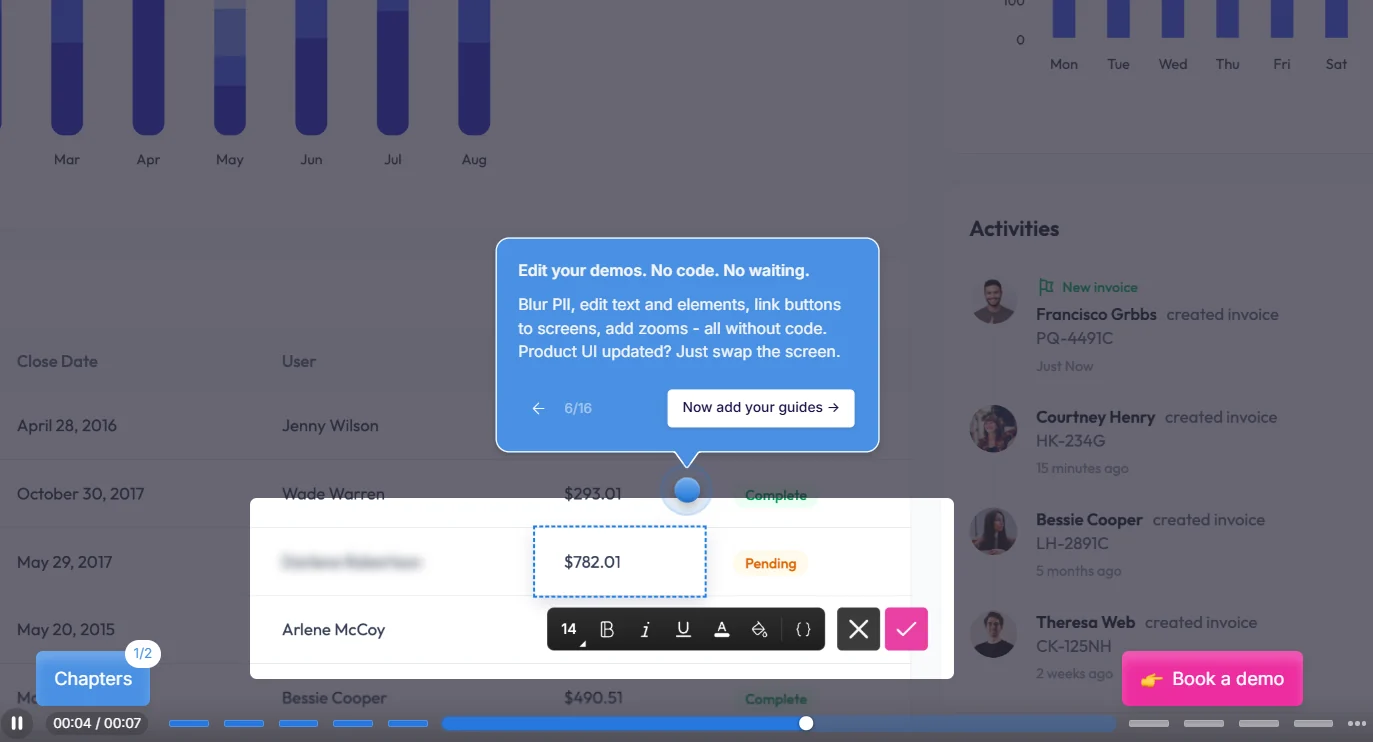
Storylane helps B2B SaaS teams automate product demos and buyer engagement. Its platform lets teams create interactive HTML and screenshot-based demos, organize deal content in Hubs, and use RepX to answer questions and qualify website visitors.
Use cases
Product Marketers, Growth & Demand Gen, Sales, Presales & SEs, Customer Success
Key features
AI-assisted demo creation
Turn captured product screens into guided demos faster by letting AI create an initial version for you.
No-code demo editing
Change text, screens, buttons, zooms, and other elements without writing code.
Deal intelligence
Connect demo engagement with Salesforce or HubSpot to see how demos influence individual deals.
RepX
Let website visitors have product conversations with an AI agent that answers questions, handles basic discovery, and qualifies leads.
Hubs
Combine demos, videos, pricing, documentation, and case studies into one shareable resource for a prospect or deal.
Storylane MCP
Connect Storylane to an AI assistant so it can navigate product flows and help create demos.
Customer reviews
4.7/5 on G2. Customers like Storylane for its simple demo creation process. They find the AI helpful for planning steps and structuring demos. The recording and editing process is also easy.
A limitation to consider
Edits made after creating a GIF may not carry over, so you may need to recreate it. Full HubSpot integration requires a higher-tier plan.
Pricing
Demo Suite: Free at $0, Starter at $40/month, Growth at $500/month, Premium at $1,200/month, and Enterprise with custom pricing. RepX: Starts with a 30-day free trial. Growth starts at $2,000/month for up to 20,000 monthly visitors, Premium starts at $3,000/month for up to 60,000 visitors, and Enterprise has custom pricing.
3. Navattic
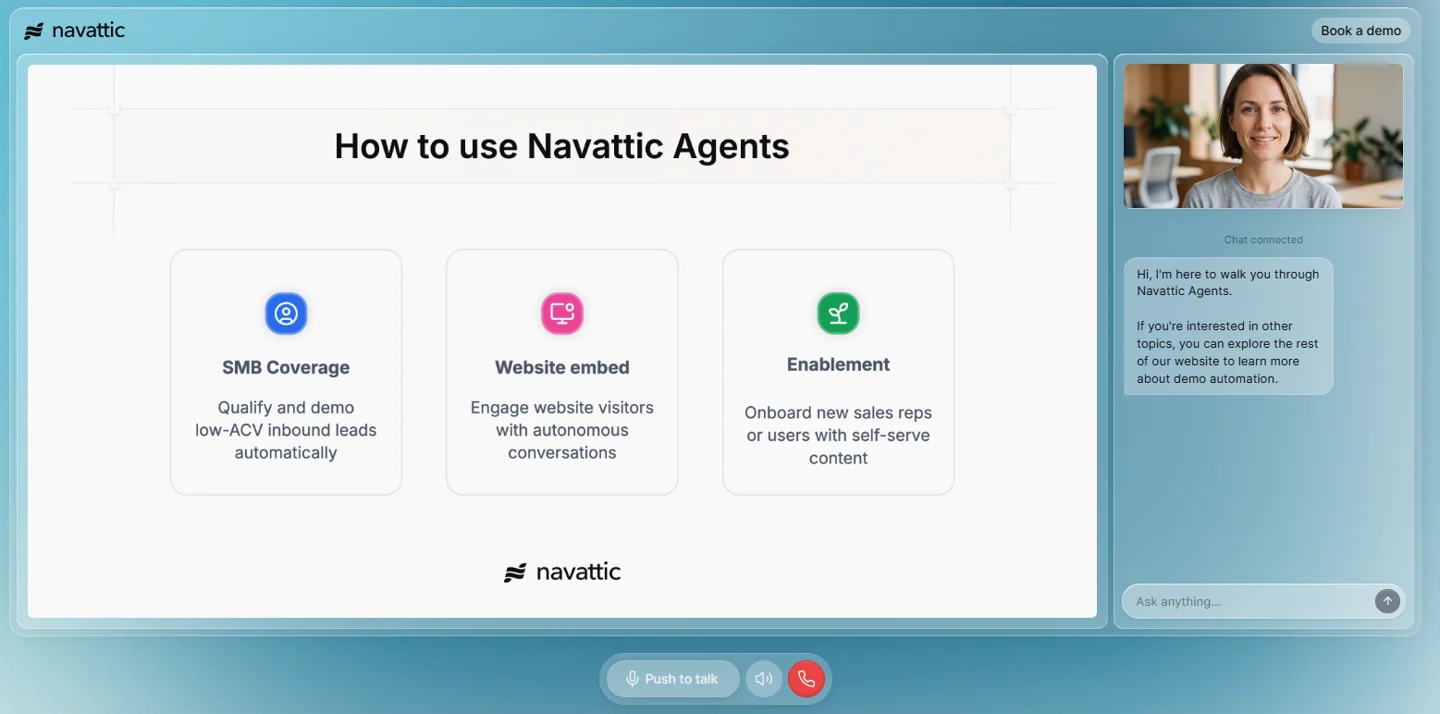
Navattic is a demo automation platform that makes software buying easier. It helps buyers explore products through modern, self-serve demos, guided journeys, and conversational tools.
Use cases
Marketing, Sales, Solution Engineers, Growth & Demand Gen
Key features
AI-assisted demo creation
Use Copilot to create a first draft with demo copy, tooltips, CTAs.
Demo localization
Repurpose demos into 20+ languages, including translated text, voiceovers, and product captures.
Navattic Agents
Let prospects interact with AI agents that answer product questions, guide them through workflows, and qualify them in real time.
Launchpad
Share customized demos with prospects, track engagement, and identify what buyers care about and who else is involved in the deal.
AI-powered editing
Make bulk changes to tables, content, themes, and other demo elements using natural-language prompts.
Navattic MCP
Connect Navattic with AI assistants such as Claude or ChatGPT.
Customer reviews
4.8/5 on G2. Customers like Navattic for its simple UI, branding options, and easy demo updates. They can quickly replace a single step by recapturing the affected screen.
A limitation to consider
Capturing complex or dynamic product elements may require manual cleanup. Keeping large demo libraries updated can also become time-consuming.
Pricing
Navattic has four plans: Starter is free, Base costs $500/month, and Growth costs $1,000/month, both billed annually. Enterprise uses custom pricing.
4. Walnut
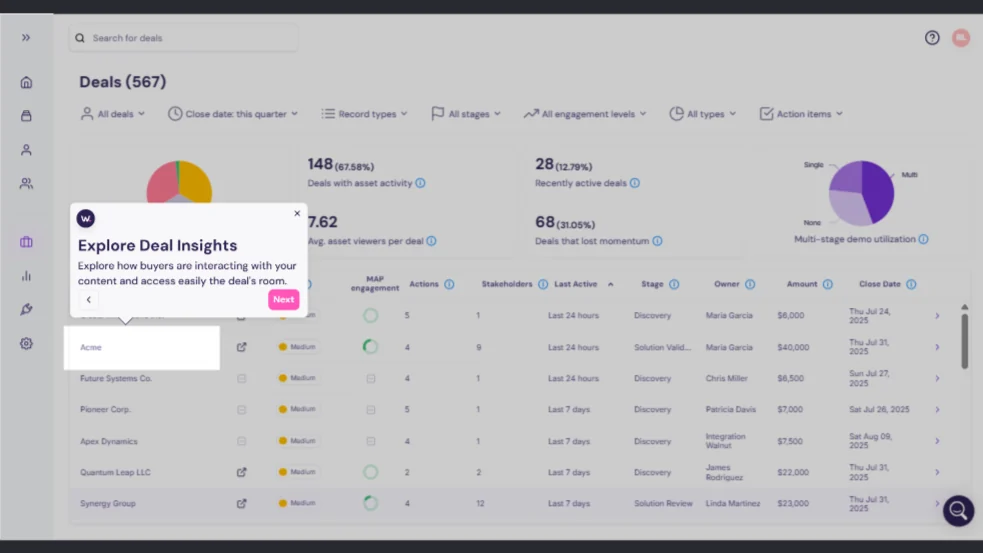
Walnut is an AI-powered buyer enablement platform that helps revenue teams create, personalize, and manage interactive demos across the buyer journey.
Use cases
Marketing, Ops & Enablement, Presales, Sales, Customer Success
Key features
StoryCapture
Record your product walkthrough and turn each screen into editable web content.
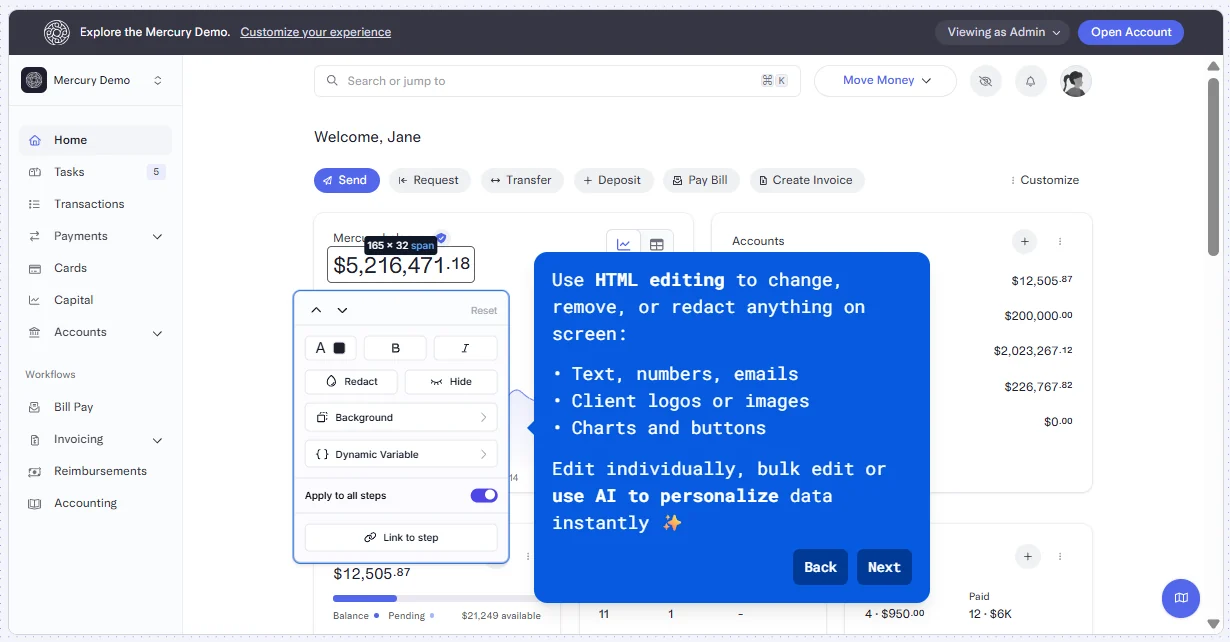
Prompt-based editing
Change copy, styling, variables, and other demo elements by simply asking AI.
Interactive Deal Rooms
Bring demos, pricing, decks, customer stories, and next steps into one personalized space.
Buyer Xpert
Let buyers ask questions inside the demo and get answers based on approved product content.
Deal intelligence
See what buyers viewed, asked about, and cared about throughout the deal.
CRM-connected engagement
Send buyer activity and demo insights to Salesforce, HubSpot, Slack, and other sales tools.
Customer reviews
4.5/5 on G2. Customers like Walnut for its flexibility in tailoring demos to different industries and buyer personas. They also appreciate being able to show relevant workflows while keeping messaging consistent.
A limitation to consider
Keeping demos accurate can require regular updates, especially when the product changes frequently.
Pricing
Walnut has three plans: Ignite at $575/month, Accelerate at $1,550/month, and Scale with custom pricing, all billed annually.
5. Supademo
Supademo is an AI-powered demo platform that helps teams create and share interactive product demos, videos, and AI Demo Agents. It supports the full customer journey, from marketing and sales to onboarding and training, with features for personalization, analytics, routing, and in-app guidance.
Use cases
Customer Success, Customer Education, L&D Teams, Solutions Engineers, Sales Reps, Marketing
Key features
AI Demo Agents
AI agent that answers questions, guides buyers, qualifies intent, and recommends relevant demos or content.
SOPs & Guides
Turn recorded workflows into step-by-step guides, training materials, or PDFs.
Route Hub
Send visitors to the right demo, video, or resource based on their role, company, or intent.
Analytics
Track views, completion, drop-offs, engagement, and viewer-level activity.
Mobile demos
Capture iOS and Android workflows and turn them into tap-by-tap demos.
Sandbox demos
Let users freely explore a simulated product without affecting production data.
Customer reviews
4.7/5 on G2. Customers like Supademo for its automated step capture and easy editing. The AI-generated narrative gives them a strong starting point, while AI voiceovers make demos easier to consume.
A limitation to consider
Some workflow steps may not record correctly, and fixing individual missed steps can require re-recording the entire workflow.
Pricing
Supademo offers five plans, starting with a free option. Scale starts at $38/month, Business at $199/month, and Growth at $350/month, all billed annually. Enterprise uses custom pricing.
6. Consensus
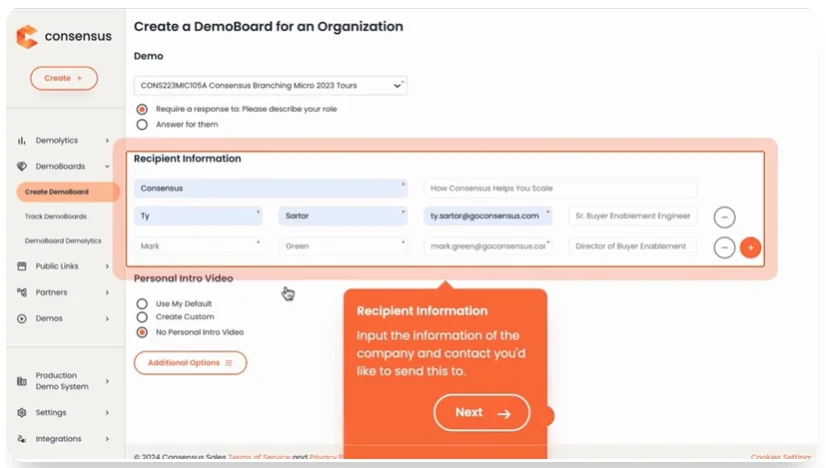
Consensus is built around a buyer-led approach to product demos. Teams can give prospects interactive tours, live demos, videos, or AI agents to explore the product on their own. Consensus also connects these interactions into demo intelligence, helping revenue teams understand buyer interest and move deals forward.
Use cases
Marketing, Sales, Presales, Customer Success
Key features
Personalized tours
Use a single prompt to update an entire tour for a specific buyer, industry, or use case.
Real product experiences
HTML Capture tours let buyers scroll, click, and interact with the product experience rather than viewing static screenshots.
Multiple tour formats
Create HTML Capture, Video Capture, or Sandbox Tours based on how much interaction and product depth the buyer needs.
Guided buyer journeys
Add hotspots, target areas, text, video, and audio to direct attention to important product features and explain key workflows.
Live demo mode
Give sales and presales teams a controlled environment for running live demos with built-in guidance.
Data privacy
Blur personal or sensitive information in tours while keeping the product experience intact.
Mobile-friendly tours
Tours are designed to provide an interactive experience across different devices.
Customer reviews
4.7/5 on G2. Customers praise Consensus for making demos easy to share and track, with Demo Boards, detailed analytics, and Salesforce integration standing out.
A limitation to consider
Some users find the UI/UX less polished than expected. Reviewers also mention limited branding customization and difficulty managing older video assets.
Pricing
Consensus offers custom pricing.
7. Reprise
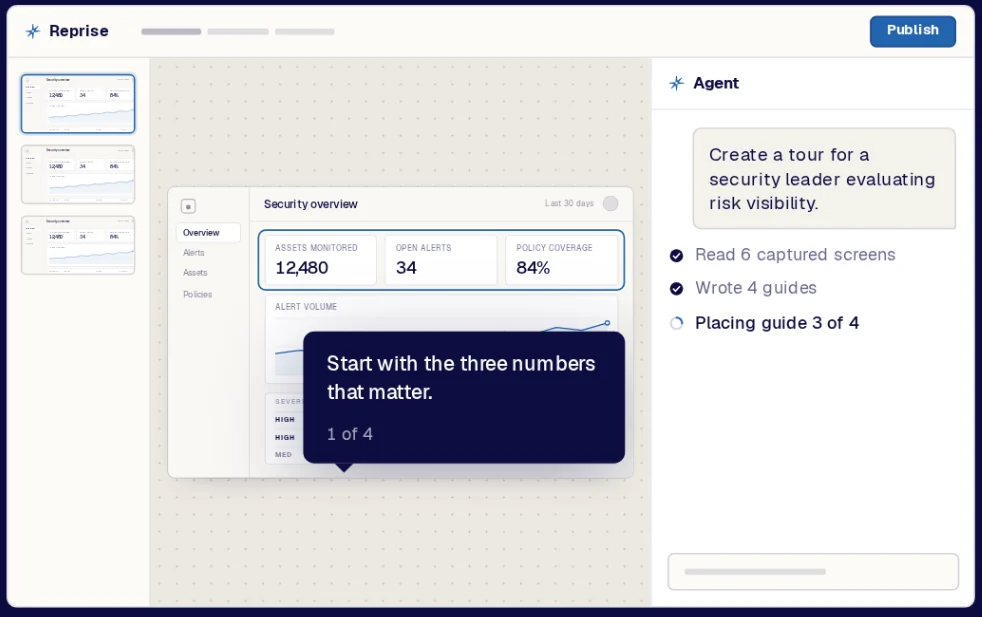
Reprise is an AI-powered demo platform for creating and sharing product demos. It supports interactive product tours, live demos, cloned environments, sandboxes, videos, and personalized demos.
Use cases
Sales, Presales, Marketing
Key features
Data injection
Add realistic, synthetic, anonymized, or prospect-specific data to the actual product so demos show meaningful charts, records, KPIs, and workflows.
Product tours
Capture product screens and turn them into guided, interactive tours with hotspots, guides, media, AI Tour Guides, and narration.
Application clones
Standalone version of the product that looks and behaves like the real application, while keeping production untouched. It can also work offline.
Reprise MCP
Build and edit demos through external AI agents such as Claude, ChatGPT, and Copilot using Reprise's MCP.
Demo flows
Combine different demo assets, such as videos, product tours, and lead forms, into one buyer experience.
Sales rooms
Give sales teams a central place to deliver and share demo experiences with buyers.
Enterprise controls
Provides the controls and governance needed for larger teams to manage demo experiences at scale.
Customer reviews
4.4/5 on G2. Customers like Reprise for its easy demo creation and customization. It requires little engineering support, is easy to share, and helps teams create demos for different audiences.
A limitation to consider
Reprise has a learning curve for complex demos. Larger demos may have performance issues, and reviewers want stronger analytics and more automation.
Pricing
Reprise offers custom pricing.
Product tour software by team
Different teams use product tours for different goals, so the best product tour software depends on how you plan to use it.
| Team | What they need | Best-fit tools |
|---|---|---|
| Revenue / RevOps | Buyer engagement data, CRM integrations, personalization, and demo management | Olto, Walnut, Reprise |
| Sales | Personalized demos, reusable tours, buyer engagement tracking, and follow-up content | Olto, Walnut, Storylane |
| Solutions Engineers | Detailed product demos, live environments, data injection, and reusable demo assets | Olto, Reprise, Storylane |
| PLG teams | Self-serve product tours that help prospects understand and explore the product | Navattic, Olto, Supademo |
| Marketing | Website demos, interactive content, personalization, analytics, and easy sharing | Navattic, Storylane, Supademo |
How we evaluated these tools
We compared each interactive product tour software across key factors, including features, ease of use, flexibility, customer feedback, and overall value:
| Evaluation criteria | What was considered |
|---|---|
| Format coverage | Interactive tours, demos, videos, and sandboxes |
| Ease of creation | UI, learning curve, and how easy it is to create and update experiences |
| Personalization and interactivity | Level of personalization and types of interactive experiences supported |
| CRM and integration depth | CRM integrations, and the depth of analytics and intent data |
| Ratings and customer reviews | G2 ratings and customer reviews |
| AI capabilities | Available AI features and AI agents, and what they can do |
| Pricing transparency | Free plan or trial availability and starting price |
| Versatility across use cases | Support for sales, presales, marketing, onboarding, and other use cases |
Frequently asked questions
What is the best product tour software for B2B SaaS?
The best product tour software for B2B SaaS depends on your requirements, use cases, and the type of product experience you want to create. Olto is a strong option for B2B teams that want interactive tours, live demos, onboarding flows, videos, sandboxes, and AI-powered guidance from one platform.
What is the difference between product tour and demo automation software?
Product tours typically guide users through a product after signup, during onboarding, feature adoption, or training. Demo automation helps prospects evaluate a product before they buy through demos, personalized experiences, and self-guided exploration.
Which tools integrate with Salesforce and HubSpot?
Olto, Storylane, Navattic, Walnut, Supademo, Consensus, and Reprise integrate with Salesforce and HubSpot. Confirm the integration features and plan access you need with each vendor.
Can product tours be personalized automatically?
Yes. Some product tour platforms can automatically personalize the experience based on the user’s role, industry, behavior, or stage in the customer journey.
How much does product tour software cost?
Product tour software ranges from free plans to paid tiers and custom pricing quotes. Choose based on the features, required integrations, and type of product experience you need.
What is an AI demo agent?
An AI demo agent is an AI-powered product expert that gives prospects a personalized, self-guided demo. It can answer product questions, qualify fit and intent, and capture the conversation for sales follow-up.